Ringtone Maker: Music Cutter
- 4.6
- Rating
- 10.00M
- Installs
- Free
- Price
 Analysis by App-foxy
I noticed the appeal of Ringtone Maker: Music Cutter almost immediately: it turns a small piece of audio into something personal without asking me to learn a full music-production suite. As a free Music & Audio app from Dairy App & Notes & Audio Editor & Voice Recorder, it focuses on a simple job—cutting music and preparing custom ringtones—rather than trying to become a complete studio. That narrow purpose is exactly why it can feel useful during the first few days, although it also raises an important question: after the novelty of making one ringtone fades, does it deserve a permanent place on the phone?
My answer is mostly yes for people who regularly change notification sounds, prepare short audio clips, or want a straightforward cutter instead of a complicated editor. I would be more cautious if you already use a polished file manager, a desktop audio editor, or a phone feature that handles ringtone trimming well. This app is at its best when convenience matters more than deep control.
What the first week feels like
The first-week experience is built around experimentation. I can imagine opening it with one particular song in mind, moving through the audio until I find the part that works, and saving a shorter version for a call or alert. That process is more approachable than importing a track into a broad audio workstation, creating a project, learning a timeline, and then figuring out how to export the result in a format the phone accepts.
You May Also Like

 Blood Strike: 2.5 Anniversary
Blood Strike’s Loadouts Turn Every Drop Into a Tactical Gamble
A close look at Blood Strike’s custom loadouts: how fast access to signature weapons reshapes its battle royale rhythm, rewards preparation, and narrows the gap between fights.

 Pandora - Music & Podcasts
Pandora’s Music Is Easy to Start, but Harder to Recover
Pandora’s strength is its low-effort path from a seed to a station. Its weak spot is how much confidence it asks you to place in connection, setup, and quiet recovery.

 8 Ball Pool
 Is Built on Rivalries, Rematches, and Routine
A close look at the rivalries, rematches, shared routines, and unanswered safety questions that turn a quick pool match into a persistent mobile community.

 Samsung Music
’s Quiet Strength Is Playing What You Already Own
Its reach comes less from spectacle than from dependable access to a personal library. That simplicity is both the app’s strongest retention engine and its ceiling.

 AccuWeather: Weather Radar
AccuWeather Review: A Quick, Clear Forecast for Everyday Decisions
For everyday plans, the best forecast is the one you can understand quickly. AccuWeather makes rain timing, radar, and local conditions easy to act on, with a few trade-offs.

 Hill Climb Racing
Why Hill Climb Racing Still Turns Crashes Into One More Run
A tiny car, a bumpy hill and one more upgrade: Hill Climb Racing keeps resurfacing because its simple chaos makes every near-miss feel personal.
More From Our News Desk
View All News


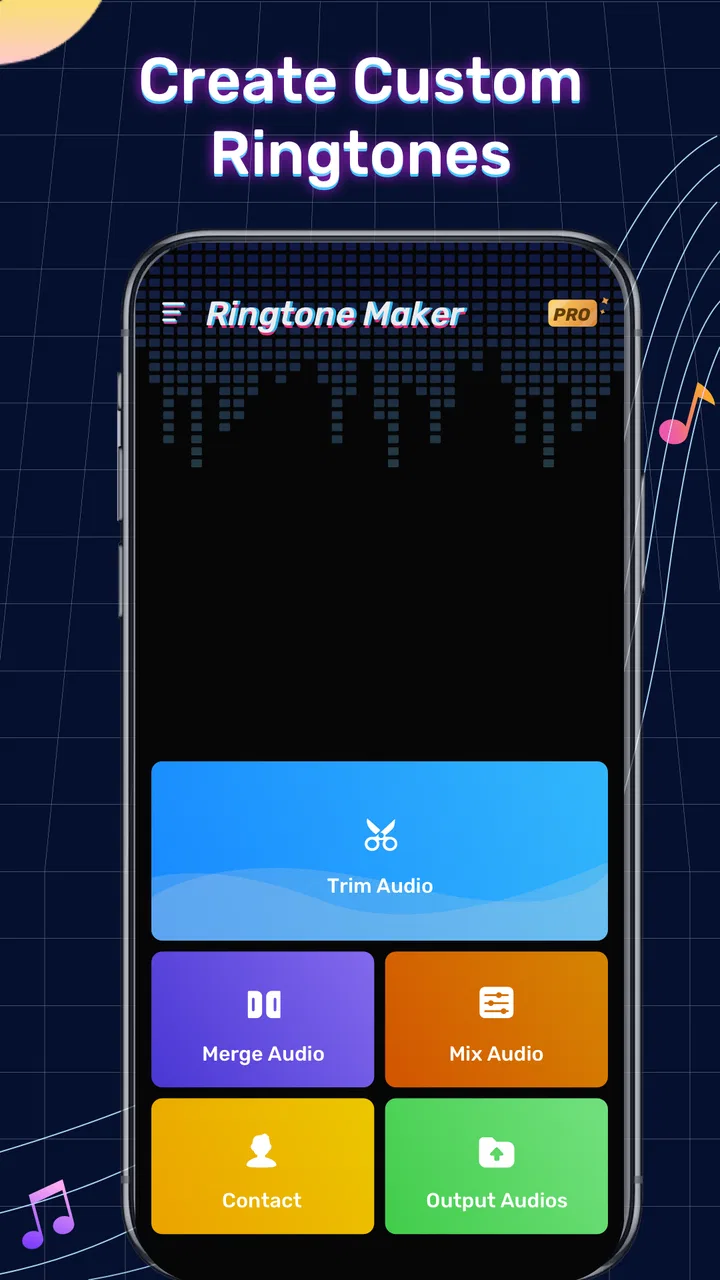
The store summary presents it as a ringtone maker and music cutter, and that description is refreshingly direct. The app is not asking me to treat a ringtone as a serious composition. It is a practical editing task: find a section, shorten it, and turn it into a custom sound. For someone who wants a recognizable chorus, a spoken reminder, or a compact clip for a particular contact, that focused workflow is more useful than a long list of professional controls.
One of the first habits I would recommend is choosing the target use before cutting. A ringtone can tolerate a longer, more noticeable passage, while a notification sound usually works better when it reaches its recognizable point quickly. If I simply select a favorite part without considering how often I will hear it, the result may be exciting on day one and irritating by the end of the week. The app makes creating a clip easy enough that I can revise it, but deciding what will remain pleasant is still my responsibility.
The app is free to install, which lowers the barrier to trying it. Its content rating is Everyone, and it supports Android devices running version 7.0 or later. That broad compatibility makes it practical for people using older phones, though the experience can still depend on the device’s audio library and system behavior. I would not treat the minimum operating-system requirement as a promise that every older handset will feel equally smooth; it simply means the app is designed to run across a wide range of Android versions.
In my imagined first-week routine, the most useful workflow would be to create one carefully chosen ringtone, one short notification, and perhaps a personal alarm sound. I would then test each one in the situation where it will actually play. A clip that sounds balanced through headphones may be too quiet in a noisy room, while a sharp opening may be unpleasant when repeated throughout the day. Testing the saved result outside the editor is a small step, but it prevents the common mistake of judging a sound only while actively editing it.
Another practical tip is to keep the original audio untouched. I would work from a copy or treat the exported ringtone as a separate file, especially when the source is a song I still want to use normally. That separation makes later changes easier and avoids confusing a shortened clip with the complete track. It also gives me a clean way to compare two versions without losing the first attempt.
The app’s average rating is 4.4 from around 270 thousand ratings, with roughly 3.3 thousand written reviews. Those figures suggest that the basic idea connects with a large audience, and its install count has passed ten million. I read that reach as evidence of a clear everyday need rather than proof that it will satisfy every type of audio editor. People who want a fast ringtone tool are a different audience from musicians who expect multitrack editing, effects, mixing, or detailed mastering.
Where the simple approach helps
The strongest part of the first-week appeal is the reduction of decisions. Instead of presenting an intimidating workspace, a dedicated cutter encourages me to think about the beginning, ending, and purpose of a clip. That is a better mental model for casual ringtone creation. I do not need to understand waveforms deeply to make a usable result, although visual awareness still helps me avoid cutting in the middle of a word or at an awkward musical beat.
I also see value for people who want more than one personal sound. A family member could have a familiar ringtone, work calls could use a calmer clip, and a morning alarm could start with something energetic. The benefit is not just customization; it is recognition. A distinct sound can tell me what kind of interruption is happening before I look at the screen.
There is a trade-off, however. The simpler the app feels, the more likely I am to notice missing precision when I try to make a difficult edit. A spoken recording may need a clean start before the first word, while music may need a cut that loops naturally. If the available controls do not give me enough accuracy, I may spend more time repeating tiny adjustments than I expected. That is the point where a desktop editor or a more advanced mobile audio tool becomes the better choice.
Why it may still matter after the novelty fades
Ringtone customization is not usually a daily activity, so lasting value cannot come from constant use. The app earns its place through occasional convenience. I might open it when I change phones, discover a new favorite track, need a sound for a special contact, or want to replace an alert that has become annoying. A tool that solves those moments quickly can be worthwhile even if it sits unused for weeks between them.
That month-to-month value depends on whether I remember how to use it without relearning everything. A focused interface has an advantage here: the purpose remains obvious. I do not need to maintain a complex project library or remember a production workflow. I can return with one audio task, create the clip, and leave. This is where a dedicated ringtone maker can beat a general audio editor for casual users, even if the general editor is technically more capable.
For a realistic everyday scenario, imagine that I am waiting for an important delivery call but keep missing it among ordinary notifications. I could choose a short, clearly identifiable section of a song, save it as a ringtone, and assign it to the relevant contact through the phone’s own settings. The app handles the cutting part; the operating system handles the assignment. That division is useful because it keeps the editor focused, but it also means I should not expect the app alone to organize every contact and sound preference.
A second scenario involves a parent or family member who wants a recognizable alert without navigating a professional editor. The person could prepare a brief clip from an audio file and use it as a personal notification. The value here is not advanced sound design. It is the ability to make a small, meaningful change without needing a computer. For users who are comfortable moving files and choosing system sounds, this can become an occasional household utility.
There is also a less obvious use: preparing audio for situations where a full song is distracting. A long track may be enjoyable privately but unsuitable as an alarm or incoming-call sound. Cutting a section with a clear opening can make the phone more functional. I would avoid choosing a clip solely because it is my favorite part; the best ringtone is often the part that identifies itself quickly and remains tolerable after repeated playback.
Maintenance is light, but not invisible
The app itself should not require a complicated maintenance routine, yet the files I create can become messy. If I make several versions with vague names, I may later forget which one is the final clip. My solution would be to use descriptive names based on the purpose, such as a contact or alert type, and delete failed experiments after confirming the successful export. This is a small organizational habit, but it matters more over time than the editing step.
I would also review old sounds occasionally. A ringtone that felt distinctive last month may become tiring after repeated exposure. The app makes replacement possible, but it cannot tell me when a sound has outlived its welcome. Long-term satisfaction therefore depends partly on restraint: fewer well-chosen clips are easier to manage than a growing collection of near-duplicates.
The current version is 1.01.94.0522. I would check that the installed version remains current before troubleshooting an unexpected behavior, especially after an Android system update. That is not unique to this app, but audio handling can be sensitive to changes in how a phone indexes files or presents media. Keeping the app updated is a sensible maintenance step, while also remembering that an update does not automatically solve every device-specific issue.
Storage organization is another consideration. Exported clips are useful only if I can find them later, and a ringtone maker is less convenient when its output is buried among unrelated recordings. I would create a simple naming convention and verify the saved file from the phone’s sound-selection screen. That final check answers a question many new users have: creating a clip and successfully selecting it as a ringtone are related but separate steps.
Where fatigue begins
The main source of fatigue is repetition. A sound that makes me smile the first time may become grating when it interrupts a meeting, a commute, or a quiet evening. The app encourages customization, but unlimited customization can create its own maintenance burden. I would use it to solve a specific recognition problem, not to turn every alert into a novelty.
Another possible frustration is the gap between a clean edit and a polished edit. A cut made at the wrong moment can produce a click, an abrupt vocal entrance, or an ending that feels unfinished. Even when the app makes trimming accessible, the quality of the source recording still matters. A low-quality or heavily compressed file will not become studio-quality simply because it has been shortened. For casual phone sounds, that may be acceptable; for sharing finished audio, it is a serious limitation.
Users should also keep expectations realistic about the app’s role. It is a ringtone maker, not a replacement for a full music editor. If I need layered tracks, detailed noise cleanup, sophisticated fades, or a carefully mastered export, I would choose a more advanced tool. If I only need a compact clip for my phone, the extra complexity of those alternatives may slow me down more than it helps.
The in-app purchase range runs from $1.99 to $43.99 per item. Since the app is free to install, I would begin with the basic workflow and decide whether any paid option genuinely improves my use rather than paying simply because I see an upgrade prompt. That price range suggests that optional purchases may vary considerably, so I would examine each item carefully before committing. For an occasional ringtone, the free experience may be enough; frequent users should judge any purchase by how much recurring convenience it provides.
One trade-off I would watch closely is the balance between speed and control. A dedicated cutter can save time because it avoids unnecessary tools, but the same narrow design may feel restrictive when I want to refine a transition. Before replacing another editor, I would test one difficult clip—not just an easy chorus—to see whether the trimming precision matches my expectations. That quick trial is more informative than assuming that a high install count means the workflow will suit every audio task.
Who should keep it installed
I think it is a good fit for Android users who want custom ringtones without learning a broad editing program. It is especially practical for people who change phones, personalize sounds for contacts, or occasionally need a short audio file for an alert. The Everyone rating and support for Android 7.0 or later also make it approachable for a wide range of users, including people with older compatible devices.
I would recommend it to a friend who says, “I only need to cut this one part of a song.” That sentence captures its strongest audience. The app is likely to feel less satisfying to someone who says, “I need to produce and polish an audio project.” In that case, a full-featured editor is the more honest recommendation, even if it takes longer to learn.
I would also skip it if I already have a reliable workflow built into my phone or computer and rarely change sounds. Installing another utility for a task I perform once every few years may add clutter without adding meaningful convenience. The app has lasting value when it removes friction from a recurring kind of personalization, not when it duplicates a function I already handle comfortably.
My long-term verdict
After the first-week excitement, Ringtone Maker: Music Cutter settles into the role of a small utility rather than a constant companion. That is not a weakness. A tool does not need to be opened every day to be worth keeping; it needs to work when its particular moment arrives. This one makes sense for occasional ringtone and music-cutting tasks, provided I keep my expectations centered on quick, personal phone audio.
Its biggest strength is focus. It avoids making a simple job feel like a production project, and the free entry point makes trying it easy. Its biggest weakness is the same focus: anyone seeking detailed editing, advanced cleanup, or a more complete audio workspace may outgrow it quickly. The app also cannot decide which sounds will remain pleasant, organize my notification habits, or replace the final system step of assigning a saved clip.
For me, the lasting test is maintenance. I would keep only the clips I actually use, name them clearly, test them in real conditions, and remove versions that have become annoying. With that modest routine, the app can earn permanent space as an on-demand helper. Without it, the phone may fill with forgotten experiments and the initial novelty can turn into clutter.
Overall, I recommend it to casual Android users who want a direct route from an audio file to a personal ringtone. I would not present it as a professional editor or as an essential app for everyone. Its value is quieter and more practical: when I need a custom sound, it can shorten the distance between an idea and a usable result. For that specific job, it remains a sensible free option, with optional purchases ranging from $1.99 to $43.99 for users who decide the extra value fits their habits.
FAQs for Ringtone Maker: Music Cutter
01What features does Ringtone Maker: Music Cutter offer?
Ringtone Maker: Music Cutter allows users to easily trim and edit audio files to create personalized ringtones, alarms, and notifications. It supports various audio formats and offers a simple user interface for precise cutting. Additionally, it provides features like fade in/out effects, volume adjustments, and the ability to assign ringtones to specific contacts.
02Is Ringtone Maker: Music Cutter easy to use for beginners?
Yes, Ringtone Maker: Music Cutter is designed with user-friendliness in mind, making it accessible for beginners. The intuitive interface and step-by-step instructions help users navigate through the process of creating custom ringtones. The app also includes tutorials and tips for first-time users to enhance their experience.
03Are there any costs associated with using Ringtone Maker: Music Cutter?
Ringtone Maker: Music Cutter is generally free to download and use, but it may offer in-app purchases or contain ads. These purchases typically unlock additional features or remove advertisements. Be sure to check the app's store page for detailed pricing information and to see if these extras align with your needs.
04Does Ringtone Maker: Music Cutter support all audio file formats?
Ringtone Maker: Music Cutter supports a wide range of audio file formats, including MP3, WAV, AAC, AMR, and more. However, it's always a good idea to check if the specific audio format you want to use is compatible. The app's description or help section usually provides a comprehensive list of supported formats.
05Can I share my created ringtones with others using Ringtone Maker: Music Cutter?
Yes, Ringtone Maker: Music Cutter typically allows you to share your custom ringtones with others. You can usually do this via messaging apps, email, or social media platforms directly from the app. This feature makes it easy to showcase your creativity and share personalized tones with friends and family.
Pros
- Intuitive interface for easy editing.
- Wide range of supported audio formats.
- Fast processing with minimal lag.
- Allows precise trimming of audio tracks.
- Customizable fade-in and fade-out effects.
Cons
- Contains ads that can interrupt workflow.
- Limited free features; in-app purchases needed.
- Occasional crashes on older devices.
- No cloud storage integration for backups.
- Lacks advanced audio editing tools.

Ringtone Maker: Music Cutter
Gallery